Cartoon Photo Editor ・Toon AI
- 4.2
- Rating
- 1.00M
- Installs
- Free
- Price
 Analysis by App-foxy
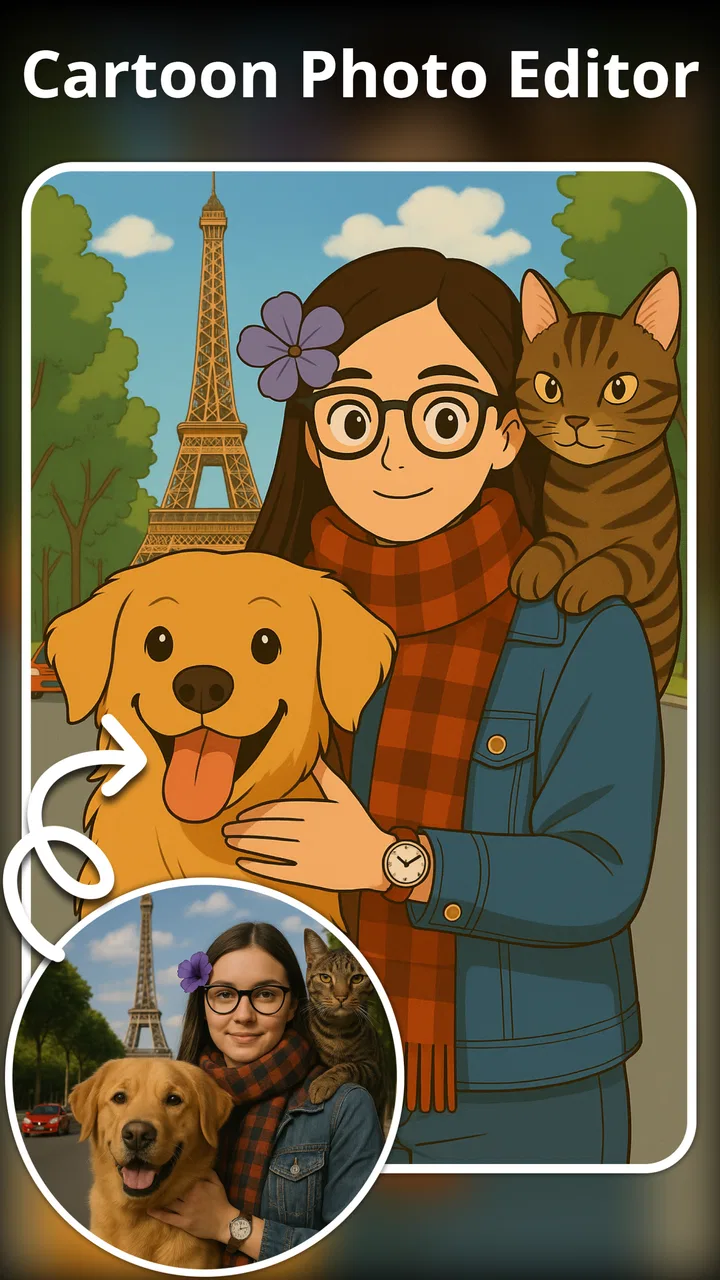
I tried Cartoon Photo Editor ・Toon AI with a simple goal: take an ordinary portrait and turn it into something I could actually use as an avatar, profile image, or playful post. That starting point matters because this is not a full drawing studio. It is an AI art and cartoon photo editor built around transforming an existing image, so the quality of the original photo has a big effect on how satisfying the final result feels.
The app comes from Digital Social Apps and sits in the Art & Design category. It is free to install, with optional in-app purchases ranging from $9.99 to $199.99 per item. I would approach it as a quick creative tool rather than a replacement for a serious illustration app. Its appeal is speed: you begin with a photo, choose a visual direction, and see whether the result gives you the personality you wanted without having to draw anything by hand.
From an ordinary portrait to a shareable cartoon
I’d approach this section as a practical look at the transformation itself: choosing a portrait, judging whether the cartoon still feels like the person, and deciding where the finished image will work best. One useful habit is to set that destination first, since an avatar needs a clear face at small size while a post can leave room for more expressive details.
You May Also Like

 Blood Strike: 2.5 Anniversary
Blood Strike’s Loadouts Turn Every Drop Into a Tactical Gamble
A close look at Blood Strike’s custom loadouts: how fast access to signature weapons reshapes its battle royale rhythm, rewards preparation, and narrows the gap between fights.

 Pandora - Music & Podcasts
Pandora’s Music Is Easy to Start, but Harder to Recover
Pandora’s strength is its low-effort path from a seed to a station. Its weak spot is how much confidence it asks you to place in connection, setup, and quiet recovery.

 8 Ball Pool
 Is Built on Rivalries, Rematches, and Routine
A close look at the rivalries, rematches, shared routines, and unanswered safety questions that turn a quick pool match into a persistent mobile community.

 Samsung Music
’s Quiet Strength Is Playing What You Already Own
Its reach comes less from spectacle than from dependable access to a personal library. That simplicity is both the app’s strongest retention engine and its ceiling.

 AccuWeather: Weather Radar
AccuWeather Review: A Quick, Clear Forecast for Everyday Decisions
For everyday plans, the best forecast is the one you can understand quickly. AccuWeather makes rain timing, radar, and local conditions easy to act on, with a few trade-offs.

 Hill Climb Racing
Why Hill Climb Racing Still Turns Crashes Into One More Run
A tiny car, a bumpy hill and one more upgrade: Hill Climb Racing keeps resurfacing because its simple chaos makes every near-miss feel personal.
More From Our News Desk



The starting photo decides more than you might expect
My first useful lesson was to choose the input carefully. A clear, front-facing portrait with good light gives the editor more to work with than a dark group picture, a heavily cropped selfie, or a photo where hair covers most of the face. That is not a criticism unique to this app; AI portrait tools generally need visible facial features. Still, it is easy to blame the effect when the real problem is the source image.
For a reliable first attempt, I would use a single-person photo with a reasonably simple background. I would also keep a few alternatives ready instead of repeatedly forcing one unsuitable image through the process. This small change makes the app feel less random. If the first output looks strange, switching to a better source often helps more than changing styles again and again.
The app is especially approachable for someone who wants an anime avatar, a baby-face interpretation, or a ToonMe-style portrait without learning layers, brushes, masks, or color adjustment. I found that its strongest use is turning a familiar photo into a quick visual experiment. It is less suitable when the goal is exact identity preservation, professional retouching, or detailed control over every part of the artwork.
Choosing a direction instead of editing every detail
The workflow is intentionally simple compared with a conventional photo editor. Rather than manually reshaping the face or painting over the image, I treated each generation as a visual suggestion. That distinction is important. You are not carefully constructing an illustration; you are asking the app to reinterpret the material you provide.
For a social profile, I would start with a fairly recognizable portrait and judge the output by three questions: does it still look like me, does the face remain readable at a small size, and does the style match the place where I plan to use it? A dramatic result can be entertaining in a chat, yet too busy for a profile picture. Conversely, a subtler cartoon treatment may look less impressive in the editor but work better once reduced to a small circle.
One practical technique is to decide the destination before generating. If the image is for a messaging profile, leave enough visual space around the head and avoid a source photo where the face is already near the edge. If it is for a post, a more expressive transformation can work because the viewer has room to see the details. This is the kind of workflow decision that makes the app more useful than simply tapping through effects.
Handling the handoff from photo to generated image
The most important handoff happens when the original portrait stops being a photograph and becomes an AI-styled image. At that point, I compare the output with the source instead of judging it in isolation. The eyes, mouth, hairline, glasses, and general face shape are the details I check first. A good cartoon result does not need to be perfectly realistic, but it should preserve enough of the person’s character to feel intentional.
This comparison also helps separate a fun transformation from a failed one. Exaggerated features may be exactly what you want for a playful avatar. They become a problem when you need the image to remain clearly identifiable or when small facial details are important. I would save the original photo separately and treat the generated version as a new creative asset, not as a trustworthy replacement for the photograph.
Another useful handoff is between the app and the place where the image will be used. Before sharing, I would inspect the image at the size people will actually see. A result that looks polished full-screen may lose its expression when cropped by a social platform. If the app gives you a strong portrait but the destination applies its own circular crop, preparing the framing first can prevent the face from being cut off.
What the result is good at
When the source photo suits the workflow, the outcome is immediate and enjoyable. The app can turn a routine portrait into something with a clear visual identity, which is useful for a temporary profile image, a birthday message, a themed post, or a lighthearted gift idea. I also see value for people who want to explore an anime-inspired look before committing time to a custom illustration.
The strongest results are not necessarily the most realistic ones. In my experience, the app makes more sense when I accept that the transformation may exaggerate the face, simplify details, or change the mood. The fun comes from seeing how a familiar image is reinterpreted. If I expected a precise digital portrait that preserved every feature, I would probably be disappointed.
It is also a convenient option for users who do not want to learn a complicated interface. A traditional editor can offer more control, but that control brings more decisions and more time. Here, the trade-off is clear: less manual work in exchange for less certainty about the exact final appearance. For a quick experiment, that is a reasonable exchange.
Where the workflow starts to break
The main friction is the gap between a one-tap promise and the unpredictability of AI image transformation. Not every photo will produce a convincing result, and a style that looks appealing in a preview may not suit a particular face. I would not install this expecting every attempt to be ready for sharing. Part of using it is selecting, rejecting, and trying a better starting image.
There is also a meaningful cost consideration. Although the app is free, optional purchases can reach $199.99 per item. That makes it important to understand your own usage before paying for anything. If you only want one playful avatar, I would begin with the free experience and avoid treating repeated generations as automatically worthwhile. Anyone who dislikes paid creative tools or wants a completely open-ended editor should compare the purchase flow carefully with alternatives before committing.
The app is rated for Everyone, which makes its basic concept broadly approachable, but an age rating should not be confused with a promise that every generated portrait will suit every audience or context. I would still review an image before posting it publicly, particularly when the transformation changes facial proportions or produces an unexpectedly comic expression.
Who should use it, and who should choose something else?
I would recommend this app to someone who has a few personal photos and wants quick cartoon variations without drawing skills. It is a good fit for casual creators, families making playful images, and users who want to refresh an avatar with something more distinctive than a standard selfie. It also works for people who enjoy comparing several interpretations of the same portrait and choosing the one with the best mood.
I would skip it if your priority is professional image preparation, precise retouching, layered composition, or consistent characters across many images. A conventional photo editor is better when you need control over cropping, color, blemish removal, and typography. A dedicated drawing application is better when you want to build an image from a blank canvas. An avatar service with fixed customization controls may be preferable when consistency matters more than surprise.
The app also may not be the right choice for someone who wants a faithful headshot. AI stylization can soften, exaggerate, or reinterpret features, and that is part of its appeal as well as its limitation. For a work profile, identification document, professional portfolio, or any situation where the photograph must represent you accurately, I would use the original image or a controlled editor instead.
Small workflow choices that improve the outcome
My first tip is to build a tiny selection process rather than judging the first generation as a final verdict. Keep two or three source photos with different lighting and expressions. Start with the clearest one, then compare the results. This reduces wasted effort and reveals whether an odd output comes from the chosen style or from the original image itself.
My second tip is to match expression to purpose. A smiling photo generally makes more sense for a friendly avatar, while a neutral portrait may give a cleaner result for an anime-inspired image. If the face is already angled sharply, the transformation has more visual information to interpret, but it may also produce a less predictable result. I would use a straight-on image when reliability matters and a more unusual pose only when experimentation is the point.
My third tip is to create a handoff folder or album for the results you actually like. Generated images can look similar at first glance, especially when you try several versions. Keeping the original beside the selected cartoon makes later cropping and sharing easier. It also prevents the common mistake of losing track of which source photo produced the most natural-looking transformation.
A fourth useful habit is to inspect the edges before sharing. Hair, shoulders, glasses, and background boundaries are often where a stylized portrait feels least convincing. If those areas look distracting, the image may still work as a small icon, but not as a large post. Choosing the final display size early helps me decide whether a flaw is important or effectively invisible.
Everyday scenario: making a new profile image
Imagine I want a new messaging avatar before a weekend trip. I would choose a well-lit solo photo, run it through the cartoon workflow, and compare the result with the original at the small size used by the messaging app. If the face remains recognizable and the crop leaves enough room around the head, the generated image is ready for that casual purpose. If the background overwhelms the face or the expression changes too much, I would try a different source rather than endlessly adjusting the same one.
For a group chat, I might choose the more exaggerated result because recognizability is not the only goal. For a professional account, I would keep the original photograph instead. This example captures the app’s real value: it is excellent when personality and speed matter, but less appropriate when accuracy and control are non-negotiable.
Performance expectations and platform fit
The app supports devices running Android 8.0 or later, so compatibility is reasonably broad for Android users with older supported phones. It is currently at version 1.1.4, and I would keep the app updated through the normal store process so the installed build remains current. The practical experience will still depend on the phone, the selected image, and the complexity of the transformation, so I would avoid starting a large batch when I need an immediate, guaranteed result.
Its popularity gives it a useful degree of visibility: the app has passed one million installs and holds a 4.4 average from around eighty thousand ratings. Those figures suggest that the basic cartoon-photo idea resonates with many users, but they do not remove the need to judge whether the workflow fits your own expectations. A popular one-tap editor can still be the wrong tool for a person who wants manual precision.
My final take after following the complete workflow
Cartoon Photo Editor ・Toon AI works best when I treat it as a fast creative filter with an AI interpretation step, not as a complete art suite. The journey from source portrait to final avatar is easy to understand: choose a suitable image, try a visual treatment, compare the result with the original, then prepare the framing for its intended destination. The biggest gains come from better input selection and realistic expectations, not from assuming that every output will be perfect.
Digital Social Apps has made an approachable option for casual cartoon portraits, anime-style experiments, and playful baby-face transformations. I like the low barrier to entry and the fact that a non-artist can produce something personal in a short session. I am less enthusiastic about the uncertainty of individual results and the potentially high cost of optional purchases, especially for people who only need one image.
My recommendation is simple: try it if you want a quick, expressive avatar and are comfortable choosing among imperfect interpretations. Start with a strong portrait, compare the output at its real sharing size, and keep a traditional editor in mind when accuracy matters. For casual self-expression, it is an enjoyable free starting point; for controlled design work, it is better viewed as one step in the workflow rather than the whole solution.
FAQs for Cartoon Photo Editor ・Toon AI
01What features does Cartoon Photo Editor ・Toon AI offer?
Cartoon Photo Editor ・Toon AI provides a range of features that allow users to transform their photos into cartoon-style images. Key features include various cartoon filters, the ability to adjust intensity, and tools for refining details. The app also supports background changes and offers numerous artistic effects to enhance creativity.
02Is Cartoon Photo Editor ・Toon AI easy to use for beginners?
Yes, Cartoon Photo Editor ・Toon AI is designed with user-friendliness in mind. The intuitive interface makes it easy for beginners to navigate through the app. Step-by-step guides and tutorials are available to help new users understand how to apply various effects and make the most of the app’s features.
03Are there any in-app purchases in Cartoon Photo Editor ・Toon AI?
While Cartoon Photo Editor ・Toon AI can be downloaded for free, it offers in-app purchases. These typically include premium filters, advanced editing tools, and ad-free experiences. Users can choose to upgrade for additional features and customization options if desired, enhancing their overall experience.
04What are the system requirements for Cartoon Photo Editor ・Toon AI?
Cartoon Photo Editor ・Toon AI is available for both Android and iOS platforms. For Android, it typically requires version 5.0 and up, while iOS devices need iOS 11.0 or later. These requirements ensure that the app runs smoothly and efficiently, providing a seamless user experience.
05How secure is my personal data with Cartoon Photo Editor ・Toon AI?
Cartoon Photo Editor ・Toon AI takes user privacy seriously. The app adheres to standard privacy protocols, ensuring that your photos and personal data are protected. It’s recommended to review the app’s privacy policy and terms of service to understand how your information is used and stored.
Pros
- Easy-to-use interface for quick edits.
- Wide variety of cartoon styles available.
- High-quality output for sharing.
- Fast processing with AI technology.
- Regular updates with new features.
Cons
- In-app purchases for premium features.
- Limited free options available.
- Occasional ads can be intrusive.
- Requires stable internet connection.
- Large app size may affect storage.

Cartoon Photo Editor ・Toon AI
Gallery